Block Jitter: The Art of Controlled Chaos

What is Block Jitter?

Block Jitter cuts your image into a grid and randomly displaces some blocks. Looks like corrupted video, broken JPEG compression, or a TV signal falling apart.
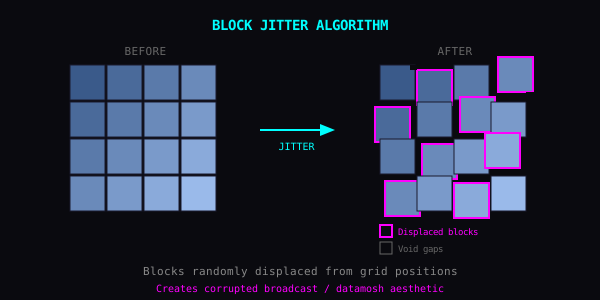
Block Jitter Algorithm Diagram

How It Works

  • Split image into blocks (size configurable)

  • Randomly select some blocks

  • Shift selected blocks by random amounts

  • Fill gaps with black, duplicates, or wrapped pixels
  • Parameters

    Block Size

  • 4-16px: fine grain, subtle static

  • 16-64px: classic glitch look

  • 64-256px: bold, aggressive chunks
  • Jitter Amount

  • Low: blocks barely move, signal hiccup

  • Medium: clear displacement

  • High: blocks travel far, goes abstract
  • Probability

  • 10-20%: scattered glitches, image mostly intact

  • 40-60%: half corrupted

  • 80-100%: total destruction
  • Void Mode (what fills the gaps)

  • Black: classic corrupted video

  • Repeat: blocks duplicate, datamosh style

  • Wrap: pulls from opposite edge
  • Recipes

    Broadcast Error: Medium blocks, low jitter, low probability. That 90s TV interference.

    Datamosh Look: Large blocks, high probability, repeat mode. I-frame corruption without the encoding hassle.

    Subtle Glitch: Tiny blocks, very low probability. Image looks almost normal. Almost.

    Full Abstract: Max everything. Subject disappears. Pure texture.

    Combinations

  • Block Jitter + RGB Shift = VHS tape

  • Block Jitter + Pixel Sort = digital decay

  • Block Jitter + Luma Stretch = damaged signal
  • Layered Corruption

    Run it twice: large blocks with low probability first, then small blocks with high probability. You get both macro and micro damage.

    The Idea

    Block Jitter doesn't add anything. It just rearranges. Same pieces, new order.