What is Block Jitter?
Block Jitter cuts your image into a grid and randomly displaces some blocks. Looks like corrupted video, broken JPEG compression, or a TV signal falling apart.
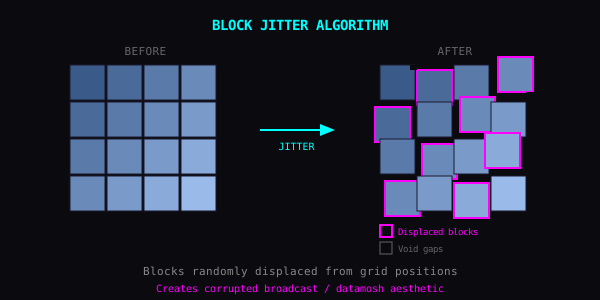
How It Works
- Split image into blocks (size configurable)
- Randomly select some blocks
- Shift selected blocks by random amounts
- Fill gaps with black, duplicates, or wrapped pixels
Parameters
Block Size
- 4-16px: fine grain, subtle static
- 16-64px: classic glitch look
- 64-256px: bold, aggressive chunks
Jitter Amount
- Low: blocks barely move, signal hiccup
- Medium: clear displacement
- High: blocks travel far, goes abstract
Probability
- 10-20%: scattered glitches, image mostly intact
- 40-60%: half corrupted
- 80-100%: total destruction
Void Mode (what fills the gaps)
- Black: classic corrupted video
- Repeat: blocks duplicate, datamosh style
- Wrap: pulls from opposite edge
Recipes
Broadcast Error: Medium blocks, low jitter, low probability. That 90s TV interference.
Datamosh Look: Large blocks, high probability, repeat mode. I-frame corruption without the encoding hassle.
Subtle Glitch: Tiny blocks, very low probability. Image looks almost normal. Almost.
Full Abstract: Max everything. Subject disappears. Pure texture.
Combinations
- Block Jitter + RGB Shift = VHS tape
- Block Jitter + Pixel Sort = digital decay. Explore browser-based pixel sorting in Pixel Sorting Online or try 28 texture effects in Texture Studio.
- Block Jitter + Luma Stretch = damaged signal
Layered Corruption
Run it twice: large blocks with low probability first, then small blocks with high probability. You get both macro and micro damage.
The Idea
Block Jitter doesn't add anything. It just rearranges. Same pieces, new order.