What Vertical Melt Does
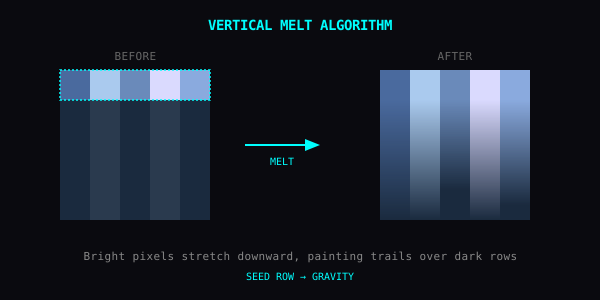
For each column, Yan finds pixels above the melt threshold and stretches them downward. Bright pixels leave trails. Dark pixels stay put.
The result looks like the image is melting — wet paint, sunlight bleeding, a candle losing its top.
How It's Different from Pixel Sort
Pixel Sort rearranges an entire row. Vertical Melt extends selected pixels downward.
- Pixel Sort: structural, like cards reshuffled. You can try horizontal and vertical column sorting directly in our Pixel Sorting Online browser tool.
- Vertical Melt: gravitational, like fluid pulled down.
Pixel Sort is louder. Vertical Melt is moodier. Use the right one.
Parameters
Melt Threshold (0–255)
The only knob that matters for the output.
- Low (50–100): even mid-tones melt. Heavy effect, often becomes mud.
- Medium (120–170): only highlights melt. Most balanced. Default sits here.
- High (200+): only the brightest pixels drip. Subtle, surgical.
The algorithm scans every column top-to-bottom. Any pixel above the threshold gets overwritten by the pixel directly above it. So once a bright region starts melting, the entire column below it inherits that bright color, all the way down — until something darker breaks the chain.
Good Subjects
- Sky and clouds: melts beautifully, softens the horizon
- Neon signs at night: lights drip down. Hong Kong / Blade Runner vibe.
- Portraits with backlight: hair dissolves into background
- Anything with a strong horizon: the boundary becomes the drip line
What to Avoid
- Already-bright images: everything melts, becomes mud
- Detailed foregrounds you want to keep: raise the threshold above the foreground's brightness
Recipes
Wet Window
- Threshold ~150
- Bright sky drips into the rest of the photo
- Subtle, atmospheric
Neon Cascade
- Threshold ~210
- Only the very brightest pixels (neon, streetlights, sun glare) drip
- Everything dimmer stays sharp
Painted Subject
- Threshold ~100
- Heavy melt, makes the photo look hand-painted with very runny paint
Combinations
- Melt + RGB Shift: chromatic drips. Hallucinatory.
- Melt + CRT: dripping broadcast. Looks like the analog TV is dying.
- Melt + Pixel Sort: two kinds of distortion fighting. Use Melt first, or experiment with vertical pixel runs in Pixel Sorting Online and the full Texture Studio.
The Idea
Photos pretend gravity stops at the shutter. Vertical Melt re-enables it.